
ASDA George
ASDA George tasks check out as a guest with your profile. Paying by card goes all the way to an order number; paying by PayPal hands you a link to finish the payment yourself.
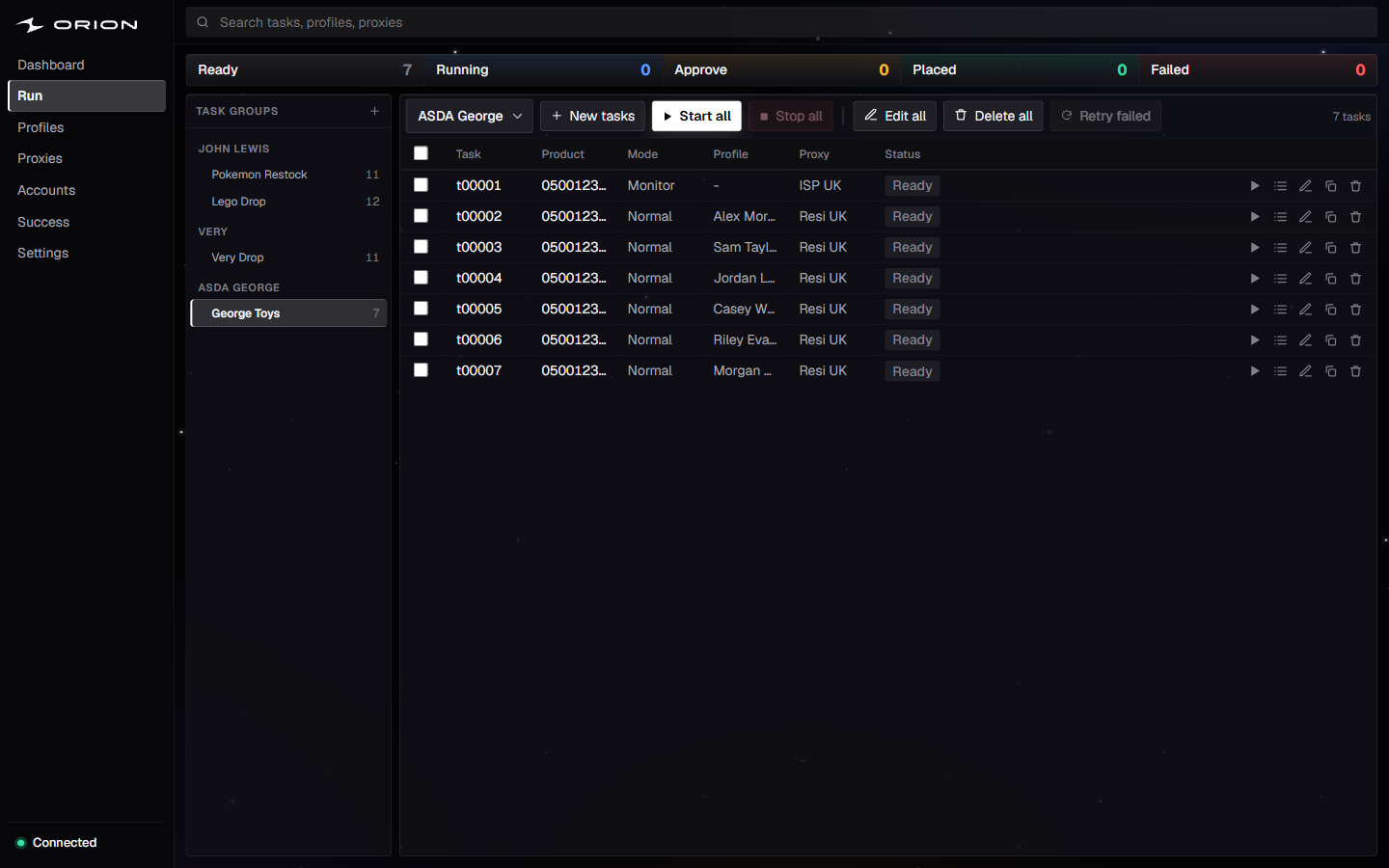 An ASDA George group: one monitor and six checkout tasks.
Quick start: recommended setup
- Put your CapSolver key in Settings. ASDA tasks will not start without it.
- Make a task group (Run > + > ASDA George).
- New tasks, mode Normal, paste the product link, tick your profiles, pick a proxy list, Pay with Card, Quantity 1.
- For a planned drop, use Special and start a few minutes early.
- Create and start.
Checklist
- A CapSolver key with balance.
- Profiles show Ready and every one has a phone number.
- Each profile's email does not already have an ASDA account (tasks check out as a guest).
- The product is already listed on ASDA George when you press Start.
- A proxy list tested against ASDA George.
Product input
| Input | Example shape |
|---|---|
| A product link | https://direct.asda.com/george/toys/any-product-name/0500123456,default,pd.html |
| The product ID | 0500123456 |
One product per window. The product must be on the ASDA site when you start; if ASDA does not know the ID, the run stops.
Modes
The modes are Monitor, Special and Normal. Normal is selected by default.
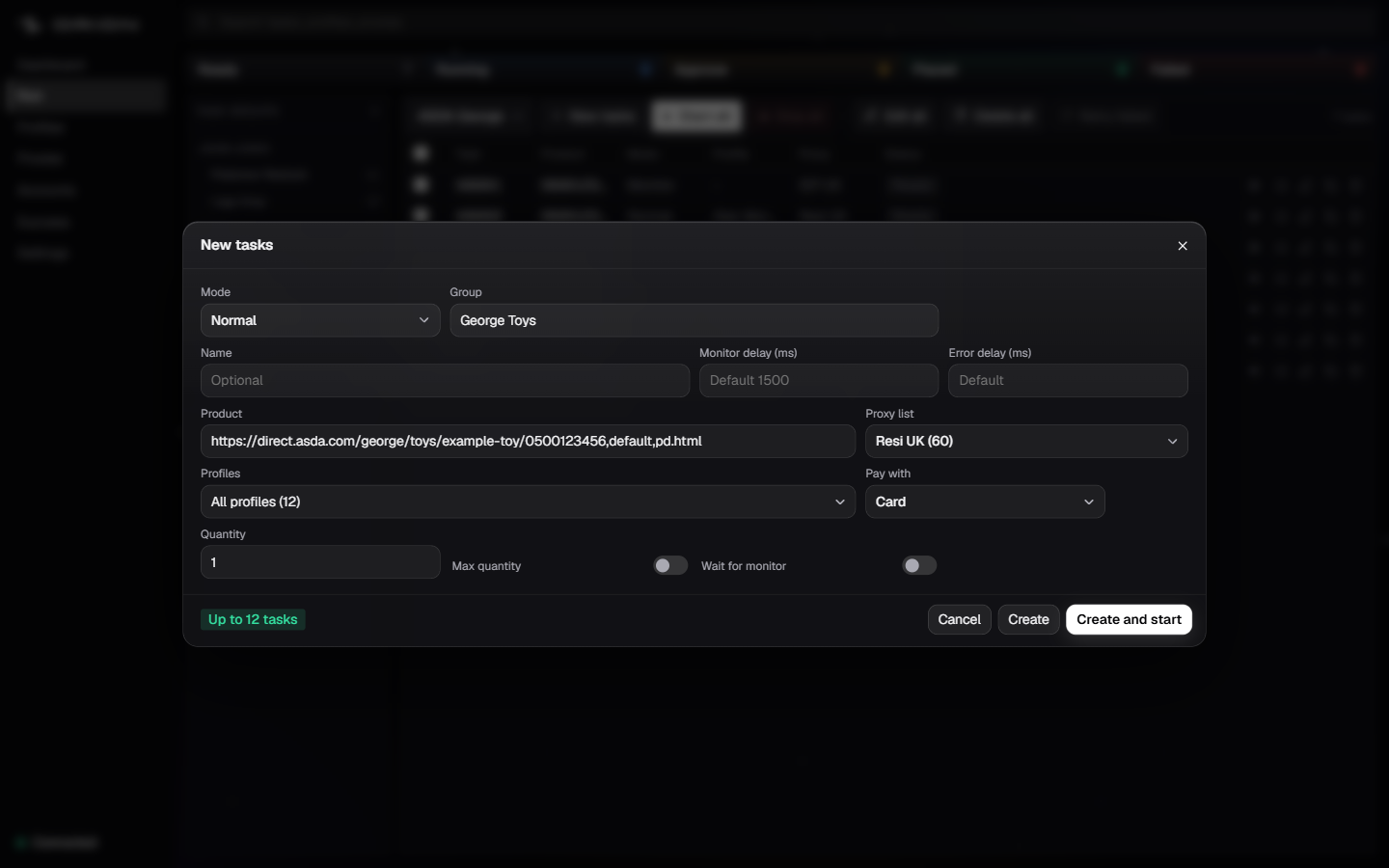 New tasks for ASDA George, Normal mode.
Monitor
Reads stock only and never touches the basket.
- Posts an In stock ping (name, SKU, units, price and link) to your Monitor webhook each time the product comes back.
- Feeds the checkout tasks for the same product in the same group, started at the same time: its proxy becomes one more stock reader for them.
- The row shows Watching stock until you stop it.
- Cost: one stock request per reader per delay. No basket, no CapSolver.
Normal
- Watches stock.
- Adds the product to the basket.
- Guest checkout: email (with the challenge, solved through CapSolver), address, cheapest home delivery.
- Pays:
- Card: the card is charged, any bank check runs in the background, and the task ends Placed with an order number.
- PayPal: the task ends with a PayPal link for you to approve (see Payment).
Use it for restocks and most drops. Cost: about 15 to 20 requests and one CapSolver solve per attempt.
Special
- At Start, each task opens a checkout using a cheap placeholder item, does the email challenge, address and delivery, and checks the card ahead of time. The row shows Using special flow.
- The placeholder is taken out and the session is kept alive.
- At go-live the task only adds your product, sets delivery and pays. This takes under a second.
Use it for planned drops where speed matters. Cost: one CapSolver solve per task at Start, even if the product never drops. Stock watching starts once every task has finished setting up (about 4 seconds each, all in parallel).
Fields
| Field | What to put |
|---|---|
| Mode | Monitor, Special or Normal. |
| Group | The task group. |
| Name | Optional label. |
| Monitor delay (ms) | How often each stock reader looks. Default 1500. 250 to 60000 (anything under 500 is treated as 500). |
| Error delay (ms) | Pause before retrying after an error. Leave empty for the default. |
| Product | A link or product ID. |
| Proxy list | The list tasks take proxies from. |
| Profiles | One task per profile. |
| Pay with | Card or PayPal. |
| Quantity | Type a number, 1 to 99. ASDA George has no Max quantity switch: type the number you want. |
| Wait for monitor | On: wait until stock is seen. Off: try straight away. |
Monitor tasks hide Pay with, Quantity, Wait for monitor and Profiles.
Stock readers
Every proxy your tasks use is also a stock reader (up to 4, or 16 with monitor tasks). Readers are staggered, so 4 readers at 1500 ms see the product every 375 ms. With no proxies there is one reader on your own connection.
Wait for monitor and restocks
- On: the task waits as Waiting for monitor until stock has been seen in the last 20 seconds.
- Off (default): the task tries to add to basket as soon as you start.
- Sold out: the task shows Waiting for restock and tries again on the next restock, or every 60 seconds anyway.
- Basket limit reached: ASDA caps how many of a product one order can have. Lower the Quantity.
Payment
Card
- The card is charged straight away. If your bank wants approval, the row shows Approve in your banking app and your Bank approvals webhook is posted.
- The task ends Placed with the order number in Success.
PayPal
- The task ends Placed with PayPal link generated!.
- Open it with Open on the row, or Copy link (right-click the row, or in Success). It is also posted to your Orders webhook.
- You approve the payment yourself. Orion cannot see whether you paid, so check your ASDA order emails.
Delivery is always the cheapest home delivery option. Click and Collect is not used.
Statuses you will see
| Status | Meaning |
|---|---|
| Starting | The run is launching. |
| Using special flow | Special mode setting up. |
| Watching stock | A monitor at work. |
| Waiting for monitor | Ready, waiting for stock. |
| Adding to basket, In the basket, Checking out | Checkout in progress. |
| Waiting for restock | Sold out; will try again. |
| Approve in your banking app | Approve the payment now. |
| Placed | Order placed, or a payment link is ready. |
| Stopped | You stopped it, or its run ended. |
Common errors and fixes
| Error | What it means | What to do |
|---|---|---|
| Blocked by the site | ASDA's protection turned the task away. Retries stay on the same proxy. | Edit the tasks to a different proxy list. |
| Challenge failed | The email challenge was not solved. | Check your CapSolver key and balance. |
| Email already has an account | The profile's email is registered at ASDA. | Use an email with no ASDA account. |
| No delivery option | ASDA offered no home delivery for this basket. | Check the product and the profile's address. |
| Basket limit reached | The quantity is over ASDA's limit. | Lower the Quantity. |
| Card declined / Card not accepted | The bank or payment provider refused the card. | Fix the card or use another. |
| Bank check failed | The bank check failed, or the payment outcome is unclear. | Check your ASDA account and bank before running again: it may have gone through. |
| Session went stale / Network error | Retried and gave up. | Run again. |
| Payment failed | The payment step failed. | Run again, or try PayPal. |
Phone numbers
A profile without a phone number stops its whole ASDA run at start. Fill in every profile's phone.